

The eligibility screen says “active.” The patient is on tomorrow's ASC schedule. The front desk still may not know whether the facility is in network for that member's product, whether the planned service is covered at an ASC, or whether authorization is required. ASC insurance verification has to answer those questions before the schedule is treated as financially ready.
The 270/271 eligibility transaction is useful. It can return coverage and financial information. It is a starting signal, not a final promise that a specific claim will be paid.
The working rule: “Active” answers whether coverage appears in force. It does not, by itself, answer the facility network, procedure benefit, authorization, or estimate questions.
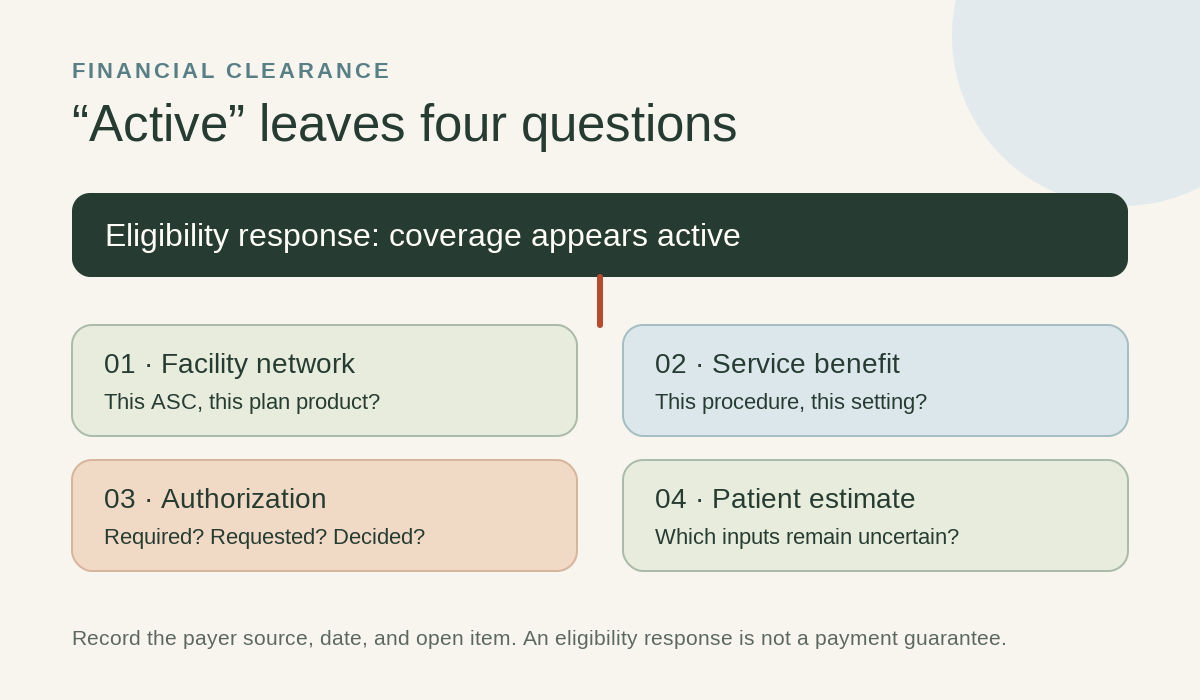
Keep each answer tied to its payer source and date. An unanswered field stays open.
Read the 271 for what it actually says
CMS describes the 270/271 as the standard eligibility inquiry and response. Operating rules require real-time responses with information such as deductibles, copays, coinsurance, network variations, and service-type coverage. CMS eligibility and claim-status operating rules.
Read the response at the level your workflow needs. Confirm the patient's identity, plan and product, coverage date, service type, reported financial responsibility, and any message that points to another plan or a manual check. A generic “active” badge may hide these details.
CMS is explicit that an eligibility response does not guarantee reimbursement when a claim is submitted. CMS operating rules FAQ. That warning is especially relevant when the center is about to quote a patient or release a case to surgery.
Verify the facility and procedure, not just the member
The next question is specific: Is this ASC in network for this member's exact plan product, and what benefits apply to this procedure at this place of service? Network participation can differ by product. A surgeon's network status and an ASC's network status are separate checks. The planned procedure, diagnosis, site, and provider identifiers can affect what the payer says.
Record what you checked and where the answer came from. If the portal does not give a reliable answer, leave the case in an “unresolved” state and use the payer's approved channel for clarification. The workflow may need a second portal, a policy document, or a phone call. Save a reference number and the date of the answer. Do not turn an unanswered question into “verified” to clear the worklist.
For example, an ASC scheduler may see an active plan and a deductible, but no answer about the facility's network status for that product. The worklist should preserve the successful eligibility check and create a separate network question. The next staff member can then ask about the facility rather than rerunning the same member lookup. This example illustrates workflow design, not a payer's actual coverage decision.
This is a financial-clearance process, not a universal coverage rule. Each payer and plan has its own requirements. A prior authorization handoff should be tracked separately from the eligibility result.
Give each exception a next action
One patient may have an active plan but an unclear facility network. Another may have a benefit response that does not specify the proposed service. A third may need an authorization decision before the date of surgery. Put those in different exception buckets:
| Exception | Next check | Useful handoff |
|---|---|---|
| Product uncertain | Confirm member's exact plan | Source, plan name, date checked |
| ASC network unclear | Ask about the facility and site | Facility identifier, payer answer, reference |
| Service benefit unclear | Check procedure and place of service | Codes supplied, policy or portal response |
| Authorization open | Confirm requirement and decision status | Request ID, owner, next date |
| Patient estimate pending | Reconcile verified benefits and contract inputs | Assumptions and open items |
The table is an Incerto workflow recommendation, not a payer checklist. It helps a manager see which cases need staff judgment and which can move forward.
Keep the patient estimate traceable
An estimate should show what was known at the time: plan response, deductible or coinsurance information, facility network status, applicable contract or rate assumptions, and any still-open payer questions. Explain uncertainty to the patient instead of presenting a precise figure backed only by an “active” eligibility result. The Medicare ASC payment breakdown shows why a facility amount, the insurer's share, and a patient's share must be kept separate; commercial plans require their own contract and benefit inputs.
For a two-week baseline, count scheduled cases with only an eligibility check, cases with a facility and service-specific answer, cases needing escalation, and cases that reached the patient estimate with an unresolved assumption. That will show where staff time goes and where to improve the handoff.
Test the handoff on two real cases
Pick one case that financial clearance completed smoothly and one that needed a callback. For each, ask the next staff member to locate four things without repeating the original lookup: the exact plan product, the facility-network answer, the service-specific benefit, and the authorization status if required. Then find the source and date for each answer.
If the smooth case can be reconstructed and the exception case cannot, the gap is often a handoff problem. Give the open question a named owner, a payer reference or portal source, and a next check date. This small audit is more revealing than counting how many eligibility responses returned “active.”
Incerto's patient preparation workflow is designed around these pre-surgery checks. If your team is evaluating a change, bring one recent case where “active” did not answer the facility question and map the steps needed to reach a documented answer.