

At 2:10 p.m., a patient replies to tomorrow’s reminder: “I can’t make it.” The reply lands in the texting platform. At 4 p.m., the scheduler is still printing tomorrow’s list with that patient on it. The center has received the message, but nobody who can change the schedule has seen it.
For an ambulatory surgery center (ASC), the fix starts with one named queue owner and a clear way to close the loop. The scheduler confirms what the patient meant, records the disposition in the schedule, and tells the patient and affected teams what happens next.
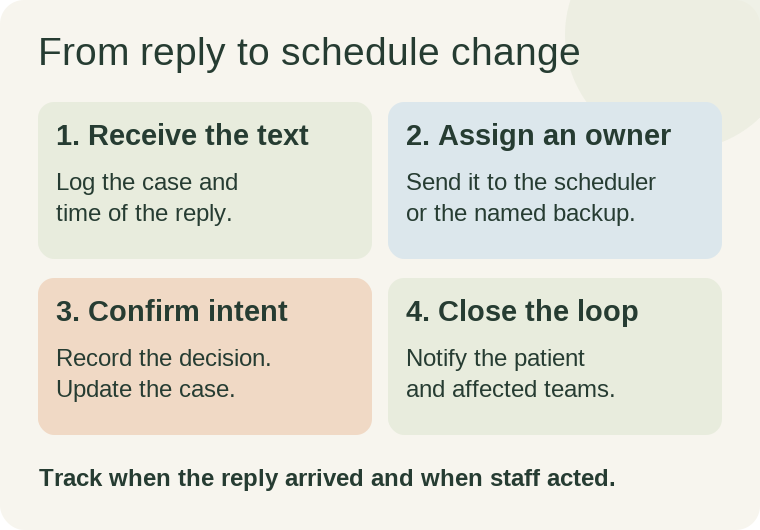
Illustrative workflow. The ASC assigns inbox coverage and the authority to change a case.
Check where an inbound reply actually lands
A quality improvement project at Walnut Creek Endoscopy & Surgery Center found that replies to its reminder texts did not reach scheduling offices. The center increased monitoring alongside several other changes, including revising preparation instructions and coordinating with physician-office schedulers. Walnut Creek quality improvement poster
Pick a test appointment and send a reply from a staff test number under your center’s approved test process. Follow the message across the systems your staff actually use. Record who sees it first, who owns the handoff when that person is out, and where the person changing the schedule records the outcome. Test outside the normal staffed window too. The result should expose any period when a reply will sit until someone signs in.
Keep the reply, decision, and schedule update visible
A patient might be reporting a conflict, asking for a different time, or cancelling the procedure. The assigned scheduler should confirm the intended change using the center’s approved channel and confirm the correct case before changing its status. Route clinical questions to the appropriate staff according to center policy.
| Status | What the next person needs to see |
|---|---|
| Reply received | Case reference, message time, and current queue |
| Assigned | Named owner or backup, next action, and due time |
| Disposition confirmed | Who confirmed what the patient wanted and when |
| Schedule updated | Case status, time of change, and whether scheduling can act on the opening |
| Follow-up sent | Who informed the patient and affected teams, plus any open contact or rescheduling task |
For the fictional 2:10 p.m. reply, the scheduler confirms the cancellation and records it at 2:25. The OR team sees a released slot while there is still time to evaluate another case. If the patient instead asks whether they can arrive later, the schedule stays intact while the scheduler checks available options.
Measure whether anyone could act in time
Start with three timestamps for each cancellation-related reply: receipt, first staff action, and final schedule disposition. At the next huddle, review replies that arrived before the center’s scheduling cutoff but stayed open past it. Check whether the delay came from inbox monitoring, assignment, patient confirmation, or updating the schedule.
Pair that review with how to track preventable day-of-surgery cancellations. If the slot does open, use the late-cancellation refill worksheet to decide whether the OR team can use it.