

Tomorrow’s 9 a.m. case comes off the list at 2:25 p.m. Your scheduler can see the gap. Before calling the next patient, they need to know how much room time actually opened, which team can cover it, and whether anyone on the list can safely and practically move up.
To refill a late-cancelled slot at an ambulatory surgery center (ASC), release the time under the center’s scheduling rules, check the room and team against a candidate case, and confirm that the patient and required reviewers can meet the new timing. Track whether the replacement procedure took place.
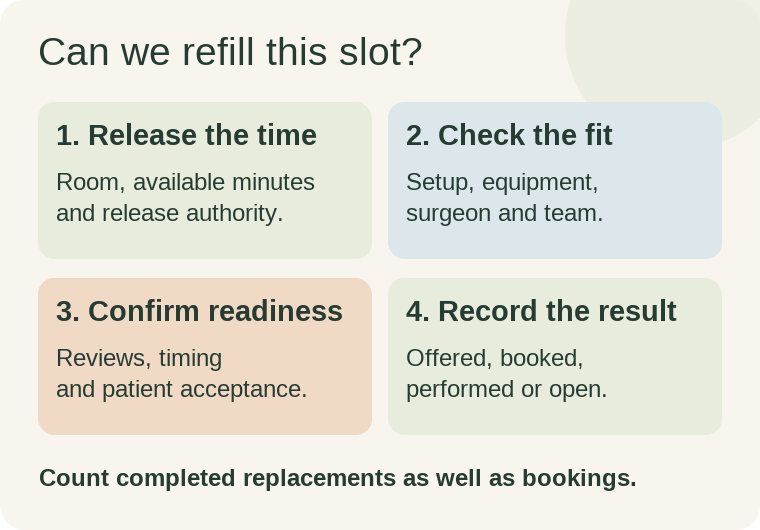
Find out what actually opened
Start the clock when an authorized scheduler confirms and releases the slot. The time a patient sent a cancellation reply and the time a scheduler could offer the slot may be hours apart. Record both if you want to see how much refill time you lost.
Include room, available minutes, setup and turnover, and any block rules that affect who can use the opening. HST Pathways describes releasing unused block time and sharing room availability as ways schedulers can make openings visible. Its industry report defines cancellations across the scheduling cycle. That rate uses a different denominator from the refill rate below. HST scheduling workflow · HST report and definitions
Use a slot-release worksheet
| Check | What the scheduler records |
|---|---|
| Slot released | Room, date, available minutes, release time, and who can offer it |
| Procedure fits | Case duration, setup, equipment or implants, and turnover |
| Team available | Surgeon, anesthesia, and required staffing confirmed by their owners |
| Case ready to move | Staff confirmation of documentation, required reviews, and financial clearance under local policy |
| Patient can move | Patient accepts the new timing and the center can confirm transport, arrival, and any approved preparation requirements |
| Outcome recorded | Offered, accepted, booked, performed, or left open, with a reason |
In the fictional 9 a.m. opening, the first candidate can travel on short notice but needs equipment already committed elsewhere. The next candidate fits the room and the team can cover it. Once the responsible staff confirm outstanding readiness items and the patient accepts the revised instructions, the scheduler books the case. The worksheet stays open until the team knows whether it happened.
Count bookings and completed replacements separately
For a weekly review, count confirmed released late slots. Then count how many got a replacement booking and how many actually hosted a replacement procedure. If a moved-up patient leaves a later opening, record that separately so you can see whether you recovered room time or moved the gap. Use your own slot count, procedure mix, and staffing constraints when comparing weeks.
Start with the last five late openings and ask which row on the worksheet stopped each one. Use the day-of-surgery cancellation guide to work backward to the causes you can catch earlier.